Every tool you give an agent is both a capability and a distraction. Five tools make an agent feel capable. Fifty tools make it feel prepared. A hundred tools can make every turn start with thousands of tokens of names, descriptions, JSON schemas, argument definitions, and nested parameters before you’ve asked anything useful. The agent looks more powerful, but first it has to read a menu it may not need.
This is one of the tensions Toolboxes in Microsoft Foundry is designed to solve at enterprise scale. A single toolbox can front Microsoft IQ, Work IQ, OpenAPI tools, A2A integrations, remote MCP servers, and several native Azure capabilities. Agent builders should be able to scale heterogeneous tool catalogs without rebuilding integrations or loading every tool on every turn. The old line about great power going hand-in-hand with great responsibility applies here, but the responsibility lives at the context layer: if the platform makes it easy to connect everything, it also needs a way to keep the model focused on what matters now.
Tool search capability in Toolbox emerged as we worked backwards from customer experience. Large tool catalogs were becoming too expensive to send to the model on every turn, and the model didn’t need most of them for most tasks. Our initial experiment of deferring all the tools and letting the model search for tools based on user query did what we hoped: it made tool-using agents cheaper, made the prompt smaller, and kept the system prompt stable enough to work well with prompt caching.
Then the real story emerged. We thought we were solving a token-cost problem; we were also building a search product. At small scale, a catalog can look like schema management: register the tool, validate the JSON, expose it to the model, dispatch the call. At larger scale, tool names and descriptions become ranking features. That’s the shift from tool-maxxing to tool relevance-maxxing.
The default agent tax
The problem isn’t just cost, though cost is the easiest part to measure. A full manifest also fills the context window with definitions unrelated to the current task. The model has to choose from an overcrowded menu, and the prompt prefix becomes larger and more fragile.
Prompt caching is enabled by default in Azure OpenAI and is the recommended behavior, so our baseline had to include it. But caching isn’t the same as not loading. Cached tokens are roughly 90% cheaper than regular input tokens, not free, and cached context still competes for the model’s attention. The obvious move was to stop loading everything upfront.
Two tools instead of a hundred
Tool search changes the initial contract between the toolbox and the model. Instead of exposing every toolbox tool in the first tools/list, Foundry can expose two meta-tools: tool_search(query, limit) and call_tool(name, arguments). The model describes the capability it needs, Foundry searches the toolbox, and the model receives a small set of matching tool definitions before calling the chosen tool with name and arguments.
The rest of the catalog stays hidden from the initial tool list. That’s why the second proxy exists: if a tool wasn’t registered in the original tools/list, many runtimes will guard against the model calling it directly as an unknown tool. call_tool gives the framework a registered, policy-aware dispatch path.
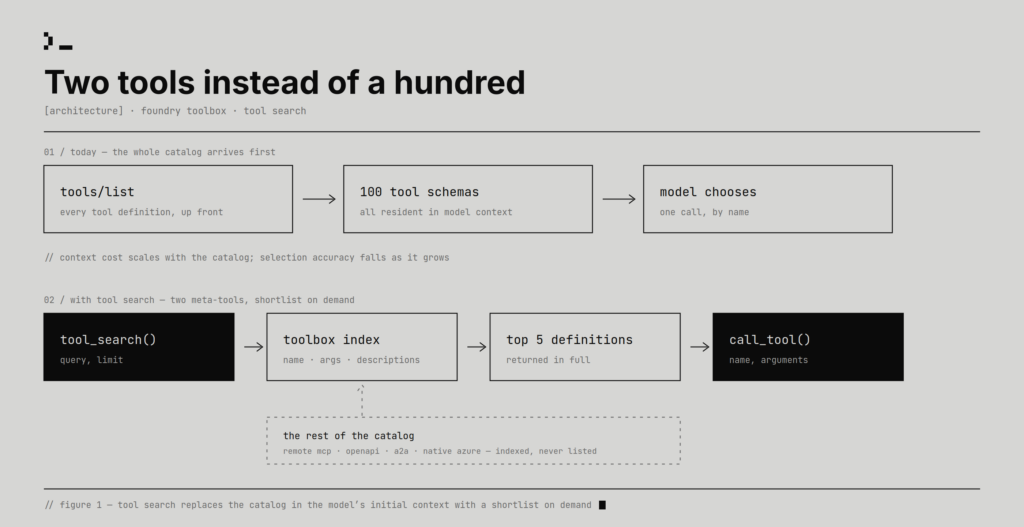
That sounds almost too small to be an architecture, which is partly why we liked it. It works inside today’s tool-calling contract and doesn’t depend on a model-specific feature. Strategically placing this at the Toolbox layer is critical because remote MCP servers, OpenAPI tools, A2A integrations, native Azure tools, and other entries can be discovered through one mechanism. Foundry indexes the tool name, description, argument names, and argument descriptions up to three levels of nesting.
That minimal shape was deliberate. We didn’t want builders to tune a retrieval system before they had shipped an agent. The default should be sane enough to try immediately: attach a toolbox, enable search, and let the platform choose the initial indexing and ranking behavior. The surface also stays model-agnostic: no special model family, new MCP primitive, or shared ranking semantics across every provider. Builders only need to tell the agent to call tool_search before concluding a capability is missing, and they can then steer the shortlist size with limit: five results by default, more for ambiguous workflows, fewer for narrow ones.
The savings were real
We evaluated tool search on ToolRet, a large-scale open benchmark with more than 44,000 tools and 7,000 queries. The goal was to measure how token savings change as the catalog grows, so we ran an ablation that increased the number of tools available to the model and compared token consumption with and without tool search. The full tradeoff is shown in Figure 2 below.
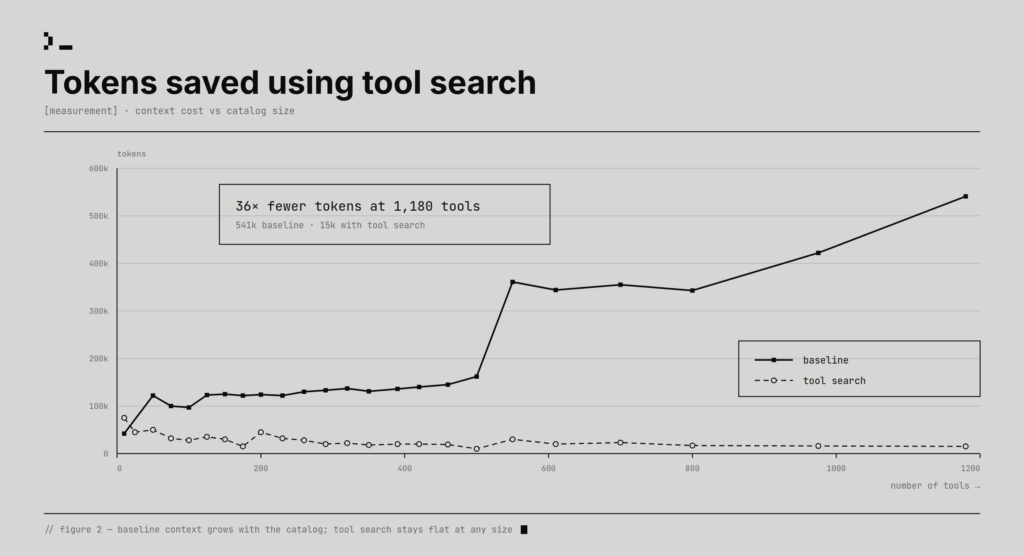
The savings scaled with toolbox size. With 50 tools in the toolbox, tool search reduced token use by more than 60%. With 1,000 tools, the savings rose above 97%. In this baseline, every tool was provided to the model upfront, and the model chose from the full catalog.
Retrieval quality was the real test
Retrieval quality was the harder question. We measured it with Recall@10 and compared tool search against BM25s and BGE-reranker-v2-gemma, as shown in Figure 3. For this run, we used only the user query and left out the benchmark’s instruction string. Generating that instruction at runtime would require another LLM call, adding both cost and latency, so the test reflected the cheaper path we would want in production. Tool search uses an enhanced sparse-retrieval pipeline with lexical similarity matching, and its Recall@10 was comparable to GPU-based reranking without depending on expensive cross-encoder reranking at serving time.
| Web | Code | Customized | |
| Tool search | 45.99% | 39.56% | 41.36% |
| BM25s | 24.62% | 28.23% | 32.39% |
| BGE-reranker-v2-gemma | 45.94% | 38.23% | 49.43% |
Figure 3: Comparing Recall@10 across various methods. BM25s, BGE-reranker-v2-gemma results are from [1].
The table shows tool search improvement over BM25s in all three categories: web, code, and customized. It is nearly tied with BGE-reranker-v2-gemma on web, slightly ahead on code, and behind on customized. Clearly, in two of the three categories, tool search is competitive with the GPU-based reranker, without the GPU cost.
These results show that, in addition to cost optimization, tool search can preserve strong retrieval quality while shrinking the tool context the model has to carry. As tool catalogs grow, the advantage comes from making the right tools discoverable at the right moment without paying the full cost of exposing everything upfront.
Tuning the search space
Benchmark testing revealed that tool search failed when tool descriptions were uneven, sometimes capturing implementation detail instead of user intent vocabulary. Some descriptions were too generic: “get,” “create,” “manage,” “REST API.” The terms had to be reflective of actual user queries.
Toolbox allows developers to configure an optional search-only text field, additional_search_text, for every tool. This additional text is indexed and helps discover a particular tool with higher accuracy. This additional text isn’t visible to models in MCP responses, thus helping you keep all the token savings. No changes are made to the original tool schema of the source MCP server. The returned schema stays clean while the search index learns aliases, domain terms, internal names, and user vocabulary.
For example, a database tool called execute_query might need to be found when a user says “analytics,” “dashboard,” “SQL,” “reporting,” or “warehouse.” A description like “runs a query against the configured database” may be accurate, but it isn’t very searchable. Search-only text can add terms users and models reach for: “analytics query, dashboard data, SQL report, warehouse lookup, inspect tables.” With tuned metadata, retrieval hit rate improved by about 56%, and end-to-end accuracy improved by about 55%, recovering to within about 4% of the full-catalog baseline.
This is where the work became more interesting than simply “saving tokens.” Tool search turned tool curation into an information-retrieval discipline. Adding a tool now raises different questions: what words will a user use, is the description specific enough to beat nearby tools, and is the tool too important to rely on retrieval?
Search is for the long tail
Most tool use has a Pareto shape. A small fraction of tools handles most tasks, but the long tail still matters because rarely used tools are often exactly the ones you need in high-stakes moments: rotate a credential, recover a failed deployment, apply a compliance exception, inspect an audit trail. Search is a good default for that long tail. It is not a good default for tools the model constantly needs.
Several tools are part of the agent’s core contract: policy tools, frequently used data access tools, or capabilities the model should never have to rediscover. Toolbox auto-pins frequently used tools based on usage at a per user level. Auto-pinned tools will be visible in tools/list call after a warmup period, with stale entries aging out as usage changes. Developers can also manually pin tools on top of this. Deterministic pinning keeps the prompt prefix stable, which preserves prompt-cache behavior.
When we would use tool search
If your toolbox has more than 10–15 tools, different tasks need different subsets, or one agent serves many workflows, tool search is worth testing. It’s most useful when the manifest is becoming a material part of cost, when the catalog changes often, or when no fixed tool subset is right.
Tool search is less compelling for tiny catalogs, agents that almost always use the same few tools, or catalogs whose descriptions are too vague to improve. Smaller is not better if the right capability disappears. Tool search changes the agent from “choose from everything” to “ask for a shortlist.” The shortlist has to be good.
Try it
Tool search is in preview for Toolboxes in Foundry. Start with the Microsoft Learn tool search docs, enable toolbox_search on a versioned toolbox, and test before promoting. Then inspect the misses. The first useful tuning pass probably won’t be algorithmic. It will be editorial: improve descriptions, add additional_search_text for domain vocabulary, and pin the tools that are part of the agent’s core contract.
1. import os
2. from azure.identity import DefaultAzureCredential
3. from azure.ai.projects import AIProjectClient
4. from azure.ai.projects.models import MCPTool, ToolSearchToolboxTool
5.
6. client = AIProjectClient(
7.     endpoint=os.environ["FOUNDRY_PROJECT_ENDPOINT"],
8.     credential=DefaultAzureCredential(),
9. )
10.
11. # ToolboxSearchToolType() enables tool search — other tools in the toolbox are discovered on
12. # demand through tool_search instead of being listed up front. Add as many MCP servers as you need;
13. # tool search keeps the agent's initial tool surface small regardless of toolbox size.
14. toolbox_version = client.toolboxes.create_version(
15.     name="my-toolbox",
16.     description="Large toolbox with tool search enabled",
17.     tools=[ ToolboxSearchToolboxTool(),
18. {
19.     "type": "mcp",
20.     "server_label": "analytics",
21.     "server_url": "https://db-mcp.internal/sse",
22.     "tool_configs": {
23.         "execute_query": {
24.             "pin": True,
25.             "additional_search_text": "SQL database analytics reporting dashboard queries",
26.         },
27.         "list_tables": {
28.             "additional_search_text": "schema columns metadata table structure discover",
29.         },
30.     },
31. }],
32. )
33. print(f"Created toolbox `{toolbox_version.name}` (version {toolbox_version.version})")
34.
For more detailed steps on integration with the agent framework of your choice, click here.
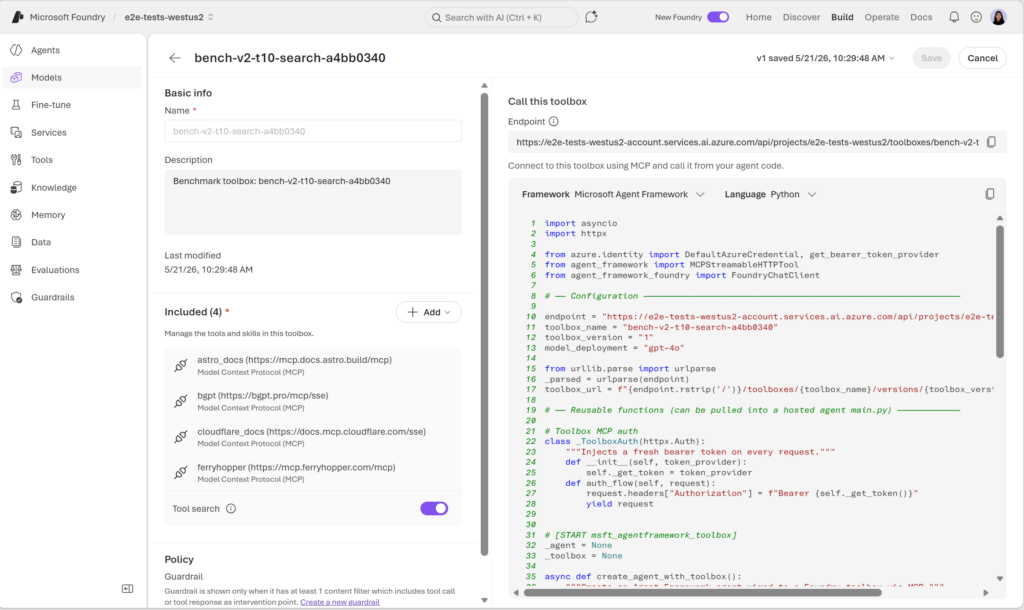
Enable tool search with one click in the Foundry Portal: