

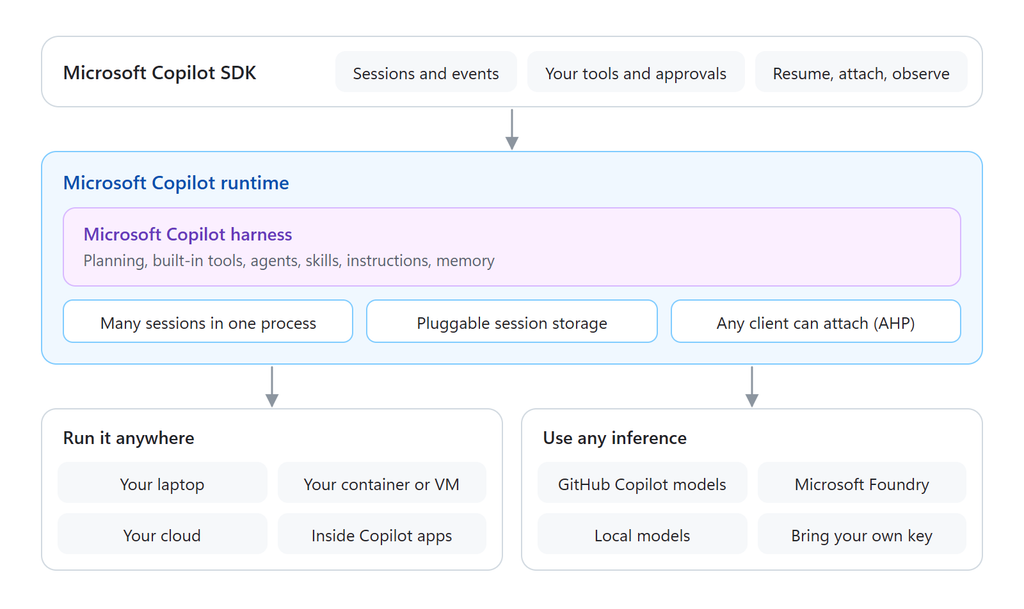
Today at Ignite, we’re announcing the new Microsoft Copilot SDK (previously named GitHub Copilot SDK). It gives you direct, programmatic access to the Microsoft Copilot harness powering products across our entire portfolio for coding, non-coding, and creative apps, platforms, and services. It can be used to build agents that run anywhere and can use any inference.
Sessions in isolation
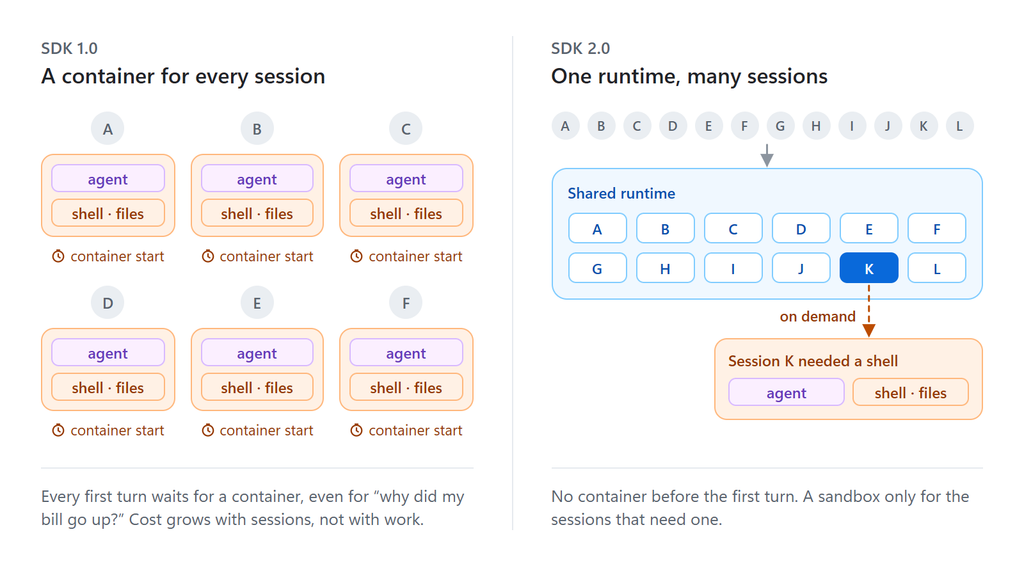
Since the Copilot SDK launch earlier this year, many teams across GitHub and Microsoft have adopted the runtime as a shared platform for Copilot agents across our services. For many use cases, hosting agents in a single container was and still is the right answer for their architectures. Most teams within Microsoft give every session its own sandbox, so data stays inside a managed boundary. If an agent compiles code, runs untrusted scripts, or needs a custom image, a hard container boundary remains an essential part of their infrastructure.
The problem was that, before today, the container was the only option, so its tradeoffs leaked into every implementation. Every session used a container whether it needed one or not. This meant that the first turn had to wait on infrastructure, cost scaled rapidly with sessions, and the session’s identity was the same as the process running it.
Virtualizing an agent’s environment
The new Microsoft Copilot SDK removes the assumption that the runtime owns the machine it runs on. The shell, disk and the identity of whoever started the runtime were replaced with new abstraction layers that give developers the control they need to design and deploy performant agents from simple chat assistants to complex multi-agent software factories.
A shared, multi-tenanted runtime
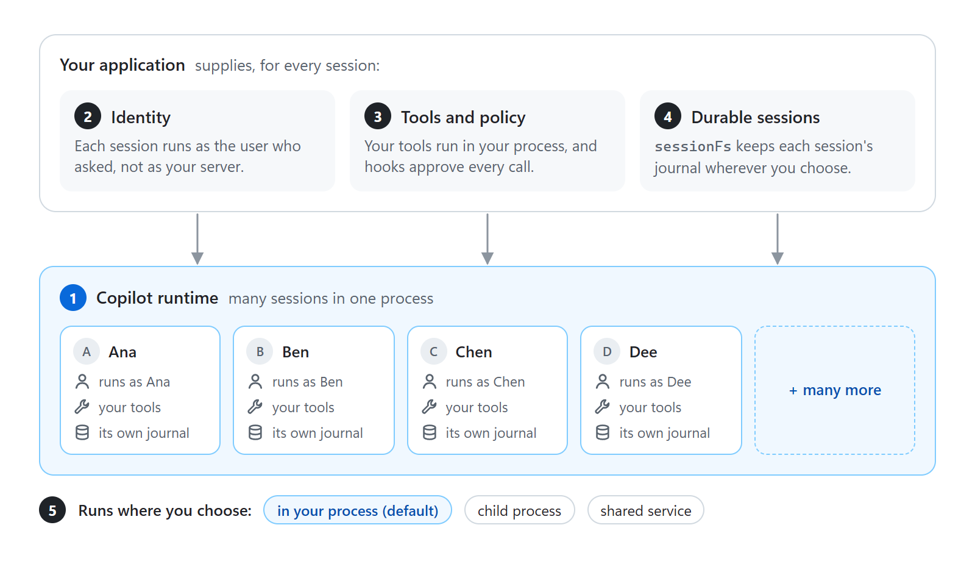
The first big change in 2.0 is a runtime that can host many sessions within a single process. Each session has its own state, credentials, tools, files, and history. No session can see another. Sessions become cheap and highly disposable. Creating one doesn’t need to start a container, a process, or a VM, which cuts both time to first token and operating cost. When users ask a simple question, the runtime can respond immediately with performant inference.
That only works if the runtime itself is lean, so we rebuilt it in Rust. On the same warmed workload, creating a client and a session and completing one turn went from 5.25 seconds on the TypeScript CLI to 55.3 milliseconds with the Rust core in-process. Scalability improved as well: 10 clients now use 126 MB of memory instead of 1,383 MB, and throughput rose from 7.55 to 120 sessions per second.
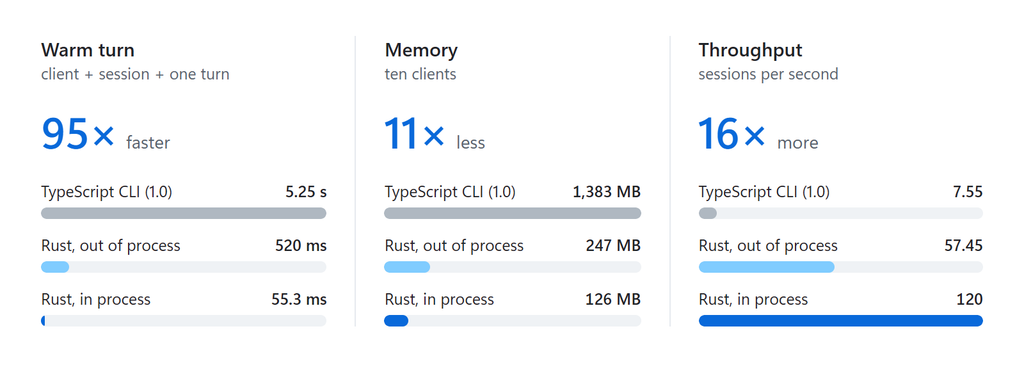
From the SDK, a shared runtime is just a connection. Many application instances can point at the same runtime service using our new empty mode:
import { CopilotClient } from "@microsoft/copilot-sdk";

const client = new CopilotClient({
  mode: "empty", // start from nothing: no ambient shell, files, or CLI defaults
});
Identities scoped to sessions, not processes
Before 2.0, the runtime acted under the identity that instantiated it. Now, each session can run independently as the identity of the user who requested it. You pass that user’s credential when you create the session, and every model call and tool call the session makes is attributed to that user, not to your server.
const session = await client.createSession({
  gitHubToken: user.githubToken, // or gitHubTokenProvider for short-lived, rotating tokens
});
For production services, a gitHubTokenProvider callback lets the runtime request a fresh token per session as tokens expire, so you never store long-lived credentials.
Host-owned tools and policies
A shared runtime is only safe if no session can reach the machine it runs on. mode: "empty" starts every session with minimal ambient capabilities: no host shell, no host file system, no default tools. You add back exactly what a session should have, and the tools you register run in your process, against your data, under your rules.
import { defineTool } from "@microsoft/copilot-sdk";

const lookupOrder = defineTool("lookup_order", {
  description: "Look up one of the signed-in customer's orders.",
  parameters: {
    type: "object",
    properties: { orderId: { type: "string" } },
    required: ["orderId"],
  },
  handler: async ({ orderId }) => orders.getForCustomer(user.id, orderId),
});

const session = await client.createSession({
  gitHubToken: user.githubToken,
  mode: "empty",
  tools: [lookupOrder],
  availableTools: ["custom:lookup_order"], // an explicit allow-list per session
});
Long lasting, durable and resumable sessions
In a container-per-session world, the session lived as long as the container. With the new runtime, a session is durable and outlives any process or client connected to it.
Two abstractions help make that work.
The first is the session journal. As a conversation progresses, the runtime appends everything it knows about the session, such as messages, tool calls, and their results, plans, and checkpoints, to an event log. Any runtime that can read that log can resume the session with its full history, whether that’s the same process after a restart, another instance of your service, or a different machine.
The second is sessionFs, which decides where that log lives. By default, the runtime keeps session state on its own disk. With sessionFs, your application supplies the file system instead, so session state and session-scoped files can live in object storage, a database, or tenant-scoped paths you control. Local disk becomes disposable:
const client = new CopilotClient({
  mode: "empty",
  sessionFs: {
    initialCwd: "/work",
    sessionStatePath: "/state",
    conventions: "posix",
  },
});

const session = await client.createSession({
  sessionId: "user-123-task-456",
  // Your provider decides where this session's journal and files live
  createSessionFsProvider: (s) => tenantStorage(user.tenantId, s.sessionId),
});
Any instance of your service can then pick the session back up by its ID, once you’ve checked that the caller owns it:
// Later, from any instance of your service:
const session = await client.resumeSession("user-123-task-456", {
  createSessionFsProvider: (s) => tenantStorage(user.tenantId, s.sessionId),
});
await session.sendAndWait({ prompt: "Where did we land on the Q3 numbers?" });
Because the session state lives outside any one process, clients can come and go. A web app can disconnect while a long task keeps running. A teammate can attach GitHub Copilot CLI to the same session to inspect or steer it. A webhook can pick a conversation back up hours later. Idle sandboxes can stop to save cost and resume, with disks intact, on the next message.
This is the same foundation as session continuity in GitHub Copilot: start a session on one surface and pick it up on another with its history intact. When you need one live session across many clients at once, the SDK can run behind an Agent Host Protocol (AHP) host. AHP is a separate, open protocol that turns an agent session into a shared, synchronized resource that multiple clients can attach to. VS Code’s agent host works this way, built on the Copilot SDK.
Native in-process embedding
We want the SDK to feel like a standard library for building agents, so we exposed a C ABI that’s available in every programming language and switched the runtime to run in-process by default. Whether it runs in your process, as a child process, or as a shared service, your agent code doesn’t change.
const client = new CopilotClient({
  connection: RuntimeConnection.forInProcess(),
});
Six agentic architectures you can build on one runtime
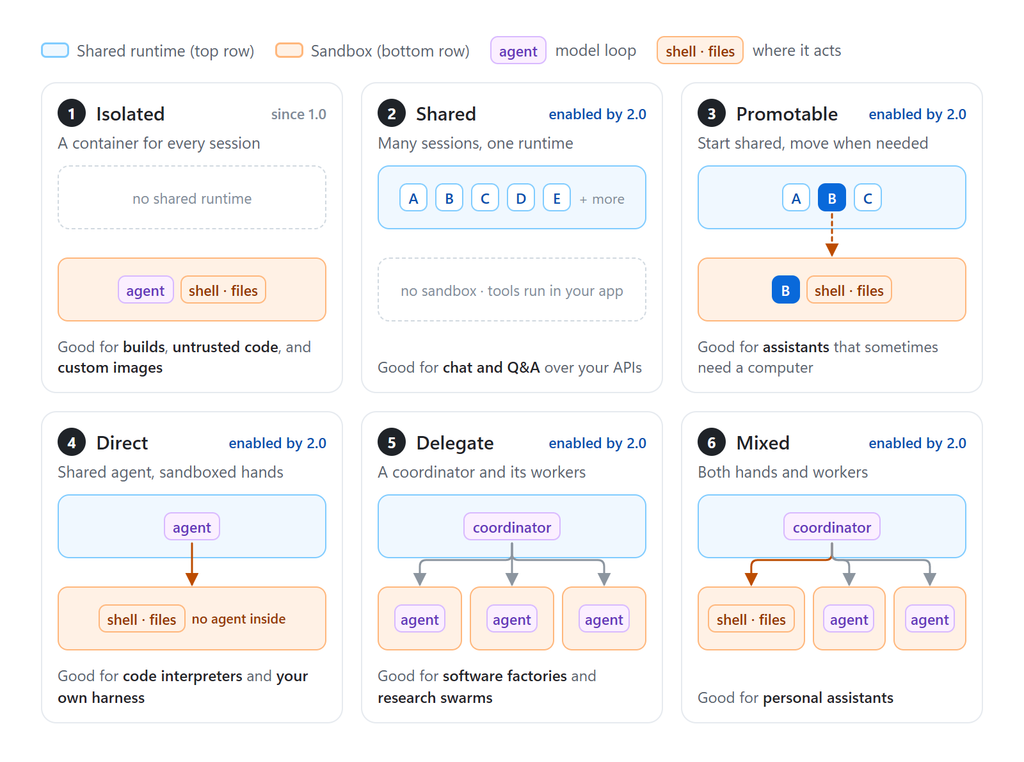
The Microsoft Copilot SDK doesn’t choose an architecture for you; it gives you a portable runtime with the multi-tenant capabilities to build the one your product needs—local or in the cloud. That lets you make two decisions separately: where the agent thinks (the model loop) and where it acts (shell and file work).
Many sessions in a shared runtime
The simplest architecture you can build with our new runtime puts many sessions on one shared process. There’s no sandbox: tools are your app’s APIs, MCP servers, or web calls, and they run under each user’s identity. There’s no container start before the first turn, and each additional session costs very little.
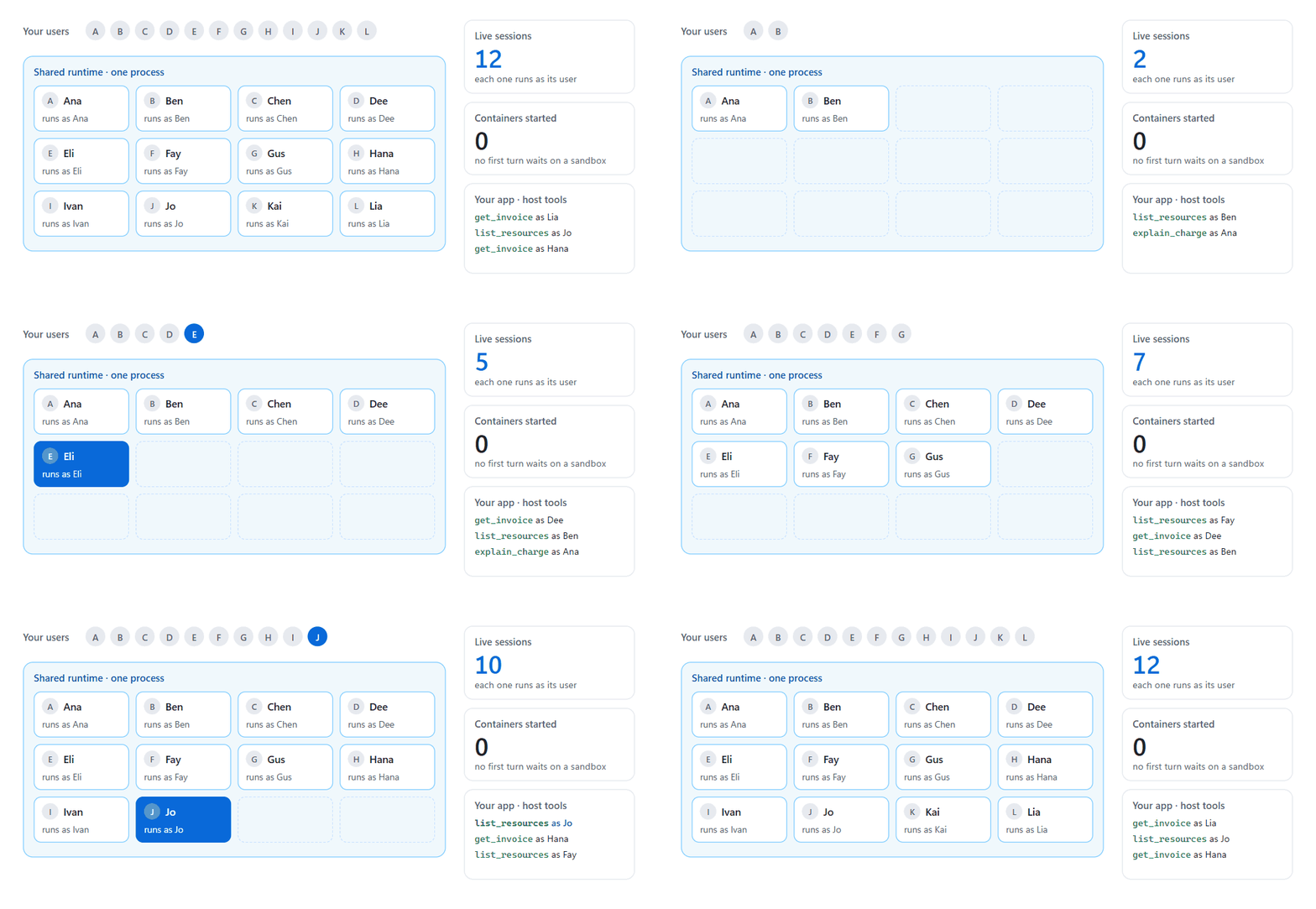
With no shell or access to a local file system, isolation is enforced by the application rather than a container boundary. Optimal for some assistants, but largely unhelpful for coding scenarios or complex knowledge work by itself.
Start shared, move when needed
Most conversations start light and stay light. Some don’t. In a promotable architecture, every session starts on the shared runtime, and your app moves a session into its own sandbox when the work needs a shell or files. The session keeps the same ID, the same conversation, and the same tools, and your app holds the same session object before and after.
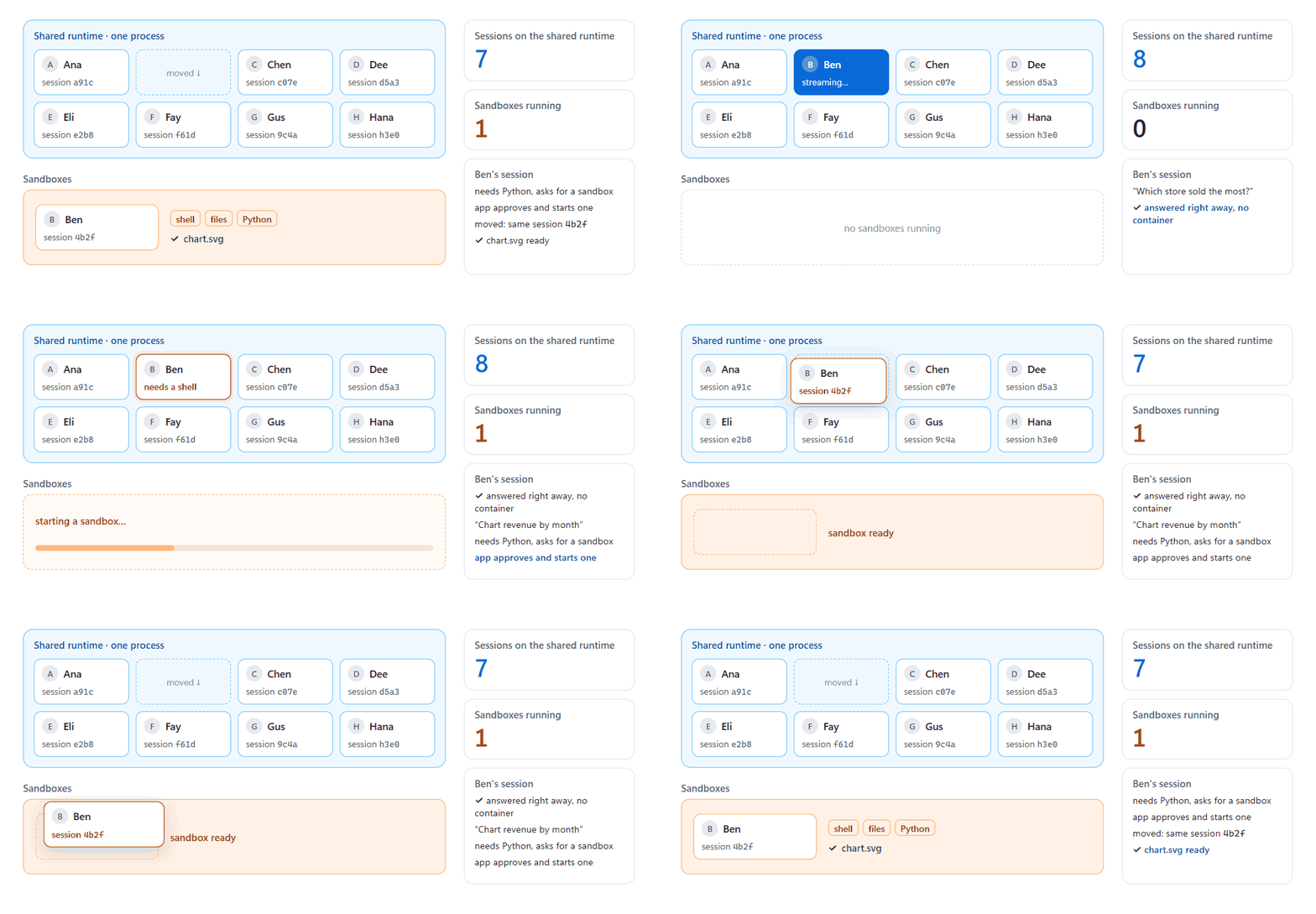
The cost is a single wait while the sandbox starts, and the move is one-way. The gain is that you pay for containers only for the sessions that need them, at the moment they need them.
Shared agent loop with sandboxed environments
Sometimes you want isolated execution without running a whole agent in every sandbox. To allow the runtime to directly drive a container, the model loop stays on the shared runtime and drives a sandbox environment with a shell and files but no agent. Host-owned tools make it work: the session’s bash, view, and edit tools are replaced with host implementations that run each command in the sandbox.
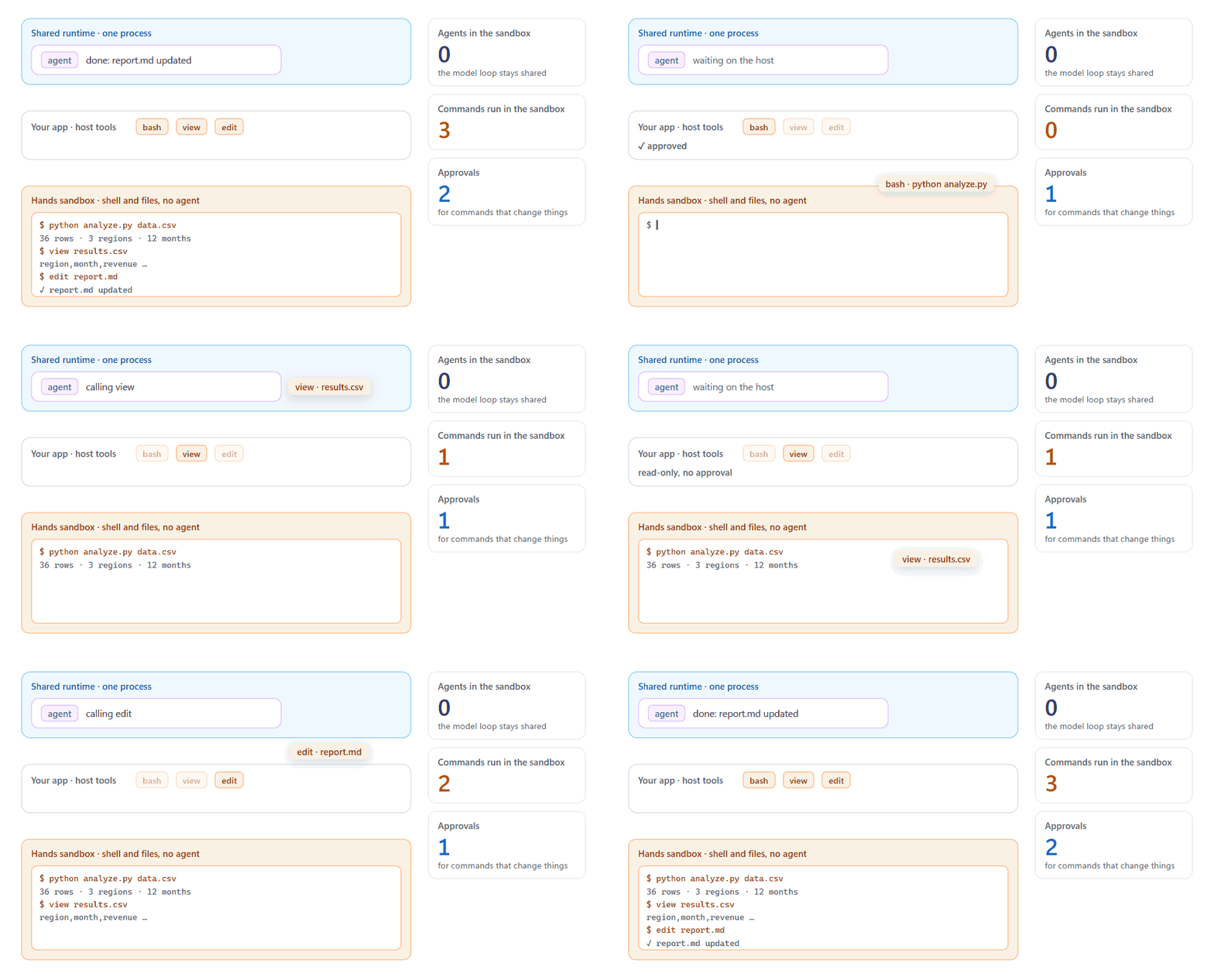
The model loop stays shared and cheap, and side effects stay isolated. In exchange, each command that changes something needs approval, and sandbox output flows back into the model’s context. It fits code interpreters and custom harnesses.
A coordinator and its workers
In a delegation architecture, a coordinator session on the shared runtime uses a tool you provide to start independent worker agents, each in its own sandbox. Each worker is a full session that can work for a long time on a self-contained task. The coordinator waits without spending model calls, then reads the results.
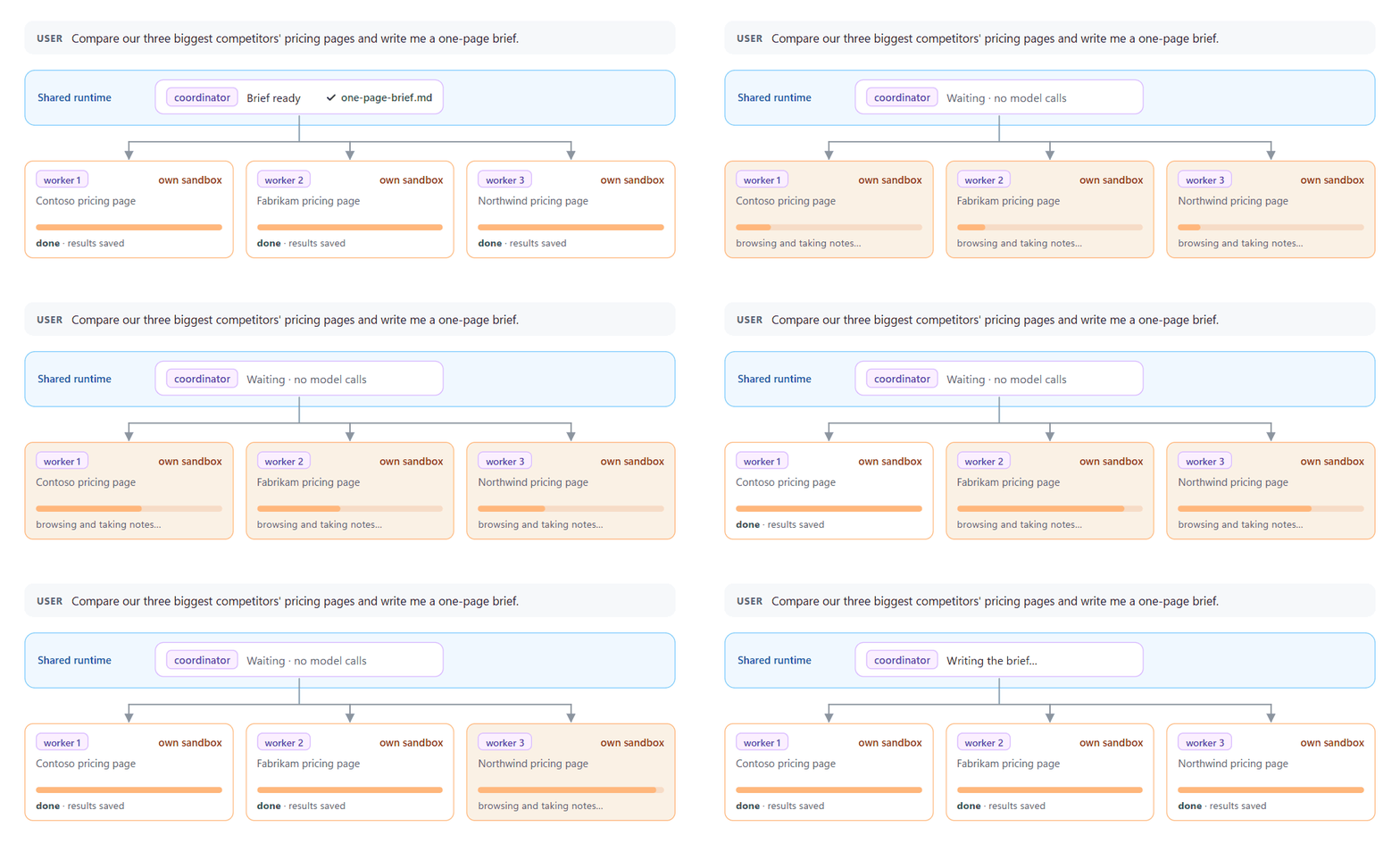
You get real parallelism and isolation between workers. You pay for an agent and a container per worker, tasks have to be self-contained, and workers don’t share a disk. This is the shape of software factories (plan, build, review, release) and research swarms (one question, many investigators).
Mixed: Direct and delegate in one conversation
A mixed architecture gives the coordinator both sandboxes and workers. It runs quick commands in its own sandbox and delegates long or parallel pieces to workers. This is the most flexible of the six and the most complex to operate, with approvals at both the command level and the worker level. It fits complex agentic applications that combine signals, triage priorities, reproduce issues, and create fixes to close the loop as true digital coworkers.
How to choose an architecture
Two questions get you most of the way there. First: does every session need a shell and files from turn one? If so, use an isolated container. If not, run the model loop on a shared runtime. The second question is what, if anything, needs a sandbox:
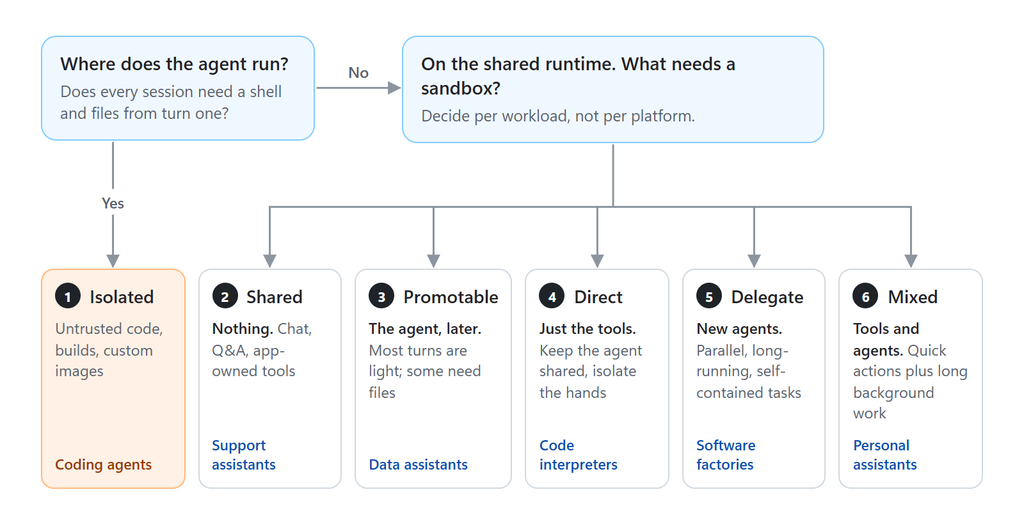
Today, you build and run these architectures on your own infrastructure. If you’d rather not, Copilot agents can already run in two managed environments: GitHub Copilot cloud sandboxes, where each session runs in an isolated Linux environment that GitHub hosts, and Microsoft Foundry managed agents, where Microsoft runs the agent loop and the sandbox on the Microsoft Copilot harness. More hosting options are coming soon.
Getting started
The Microsoft Copilot SDK is available in TypeScript, Python, Go, .NET, Java, and Rust. To begin, refer to the getting-started guide, then read the multi-tenancy guide for mode: "empty", per-session identity, and tool allow-lists to learn more about the new 2.0 capabilities.
Acknowledgements
Stephen Toub, Shay Rojansky, Mackinnon Buck, Ed Burns, Devraj Mehta, Evan Boyle, PJ Meyer, Aleksandra Radmanovic