


When leveraging agents, developers need both choice and control. They need technologies that offer clear boundaries for their agents and make it easy to choose the model with the right speed, performance, and cost profile for each task. That’s why GitHub offers frontier models from major model providers, as well as options like Project HydraFusion, an orchestrator choosing one or multiple models for each task while balancing performance, cost, and latency. It’s also why Windows has developed Microsoft Execution Containers (MXC) to help secure interactive and non-interactive agentic coding sessions.
Coming by the end of the month, GitHub Copilot will determine when a task is best handled by on-device intelligence and when it should leverage cloud-scale models. Rather than forcing developers to manage infrastructure decisions themselves, GitHub Copilot automatically coordinates local and cloud inference behind the scenes. For NVIDIA RTX Spark Windows PCs like Surface Laptop Ultra, that means we are enabling local coding in GitHub Copilot with powerful local inference models and hardware capable of delivering a great experience at the edge.
The result is poised to be the next step in the HydraFusion vision: intelligent orchestration that spans not just multiple models, but multiple compute environments including the edge. GitHub Copilot can run commands in these environments with controlled access to files, networks, system capabilities, and credentials. Developers can automate with confidence and security in mind.
Why memory matters for a local coding agent
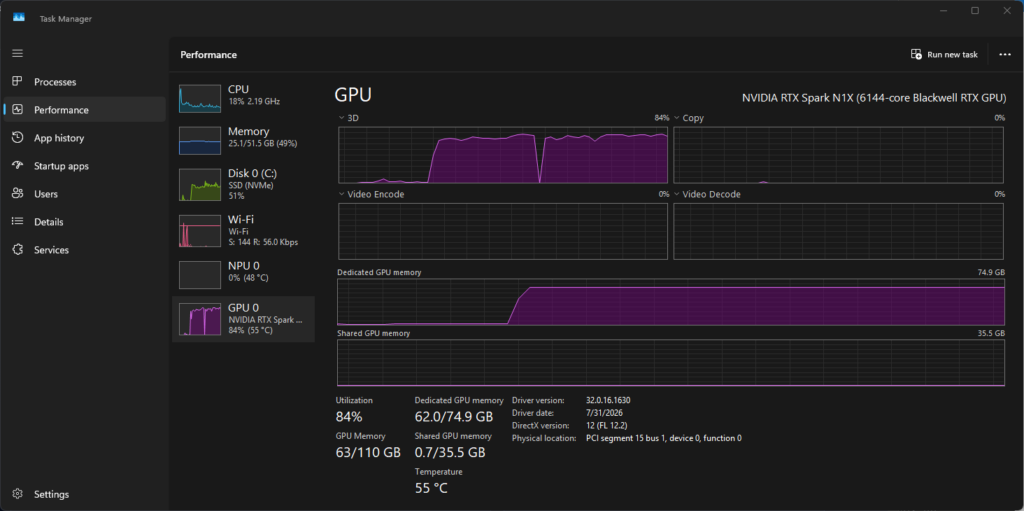
Local inference starts with a memory budget. Surface Laptop Ultra is built around NVIDIA RTX Spark, with up to 128 GB of unified memory and up to 1 petaflop of AI compute.
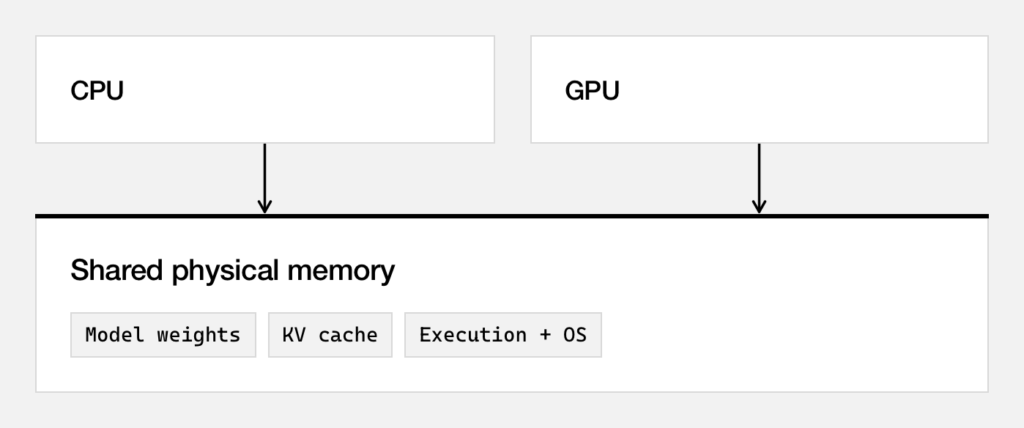
With a discrete GPU, dedicated video memory is an important constraint: moving model data between system memory and the GPU can add overhead. Unified memory gives the CPU and GPU access to a shared physical pool. That makes more capacity available to the workload, but it doesn’t make all of it available to model weights.
The operating system, your applications, and the inference runtime need memory, too. So does the key-value cache, which stores attention state for tokens the model has already processed. As an agent reads files and receives tool results, its context can grow, increasing memory use and the work needed to process the next request.
Keeping a model loaded between requests can avoid repeated loading work. However, it doesn’t guarantee constant response time; context length, memory pressure, and the rest of the workload still matter. That’s why the useful question isn’t just whether a model fits, but how it behaves over a complete coding task.
Introducing MAI Code 1.1 Flash for local coding
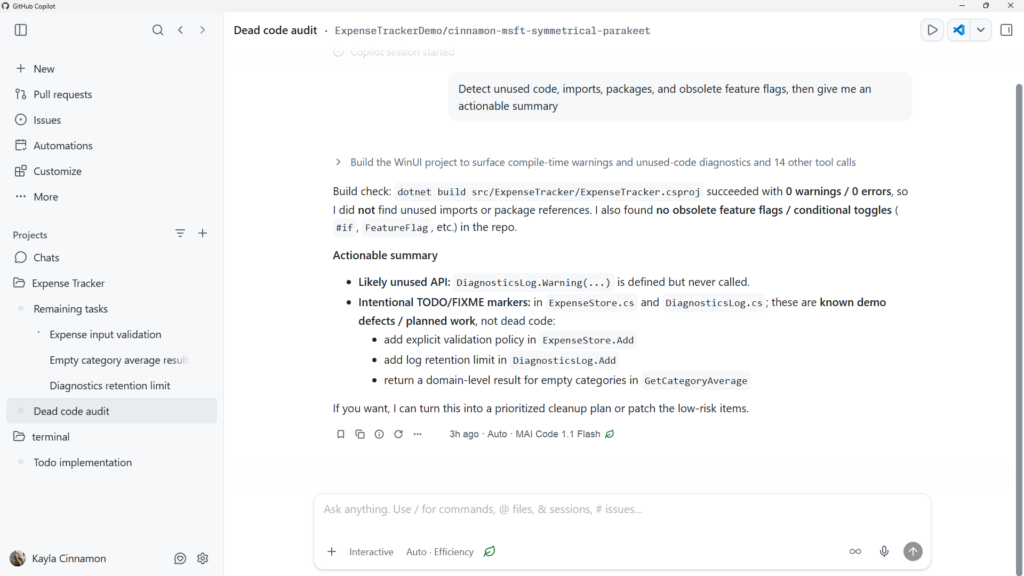
To bring this local-development experience to life, Microsoft AI developed a local version of MAI Code 1.1 Flash, a coding-optimized mixture-of-experts model with a 137 billion total and 6.8 billion active parameters. The on-device work applies quantization and speculative decoding to reduce the model footprint and improve end-to-end responsiveness while preserving the task completion and tool-use quality that matter in an agent loop.
Quantization reduces the precision used to represent model weights and activations, lowering memory requirements. Because code doesn’t degrade gracefully, the release evaluation must measure coding-task success as well as footprint: a single incorrect token can produce a syntax error, wrong identifier, malformed tool call, or broken diff.
Speculative decoding trades additional working memory for higher decode throughput and lower end-to-end latency. A drafter proposes candidate token blocks and the target model verifies them.
For a coding agent, the important tradeoff is whether the smaller model can still complete the same tasks. A smaller footprint is useful only if changes in code quality and tool use are understood.
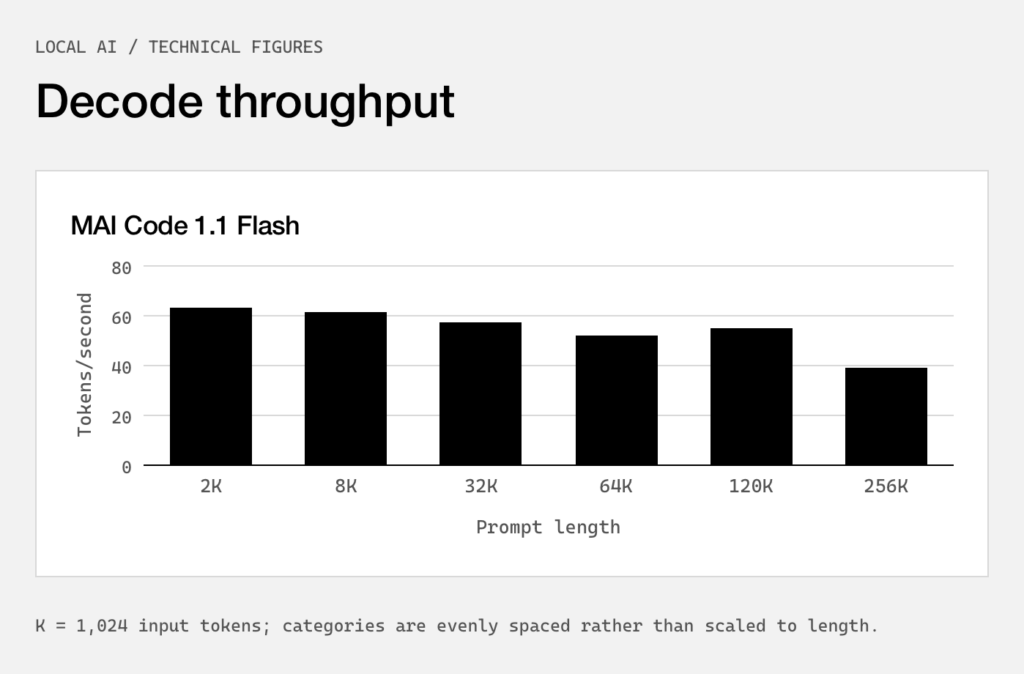
With our first shipping version of MAI Code 1.1 Flash on Surface Laptop Ultra we achieve the following performance at different context lengths, with peak memory usage of 75.5GB at 256k context. At 64k and 128k context, prompt-processing throughput reaches 923.5 and 769.8 tokens per second, respectively.
The quantized version of MAI Code 1.1 Flash we use on device retains capability impressively compared to the Bfloat16 cloud variant, coming in at 53GB, an 80% reduction in size.
| Benchmark | Dataset size | MAI Code 1.1 Flash | GPT OSS 120B* | MAI Code 1.1 Flash Quantized on Device |
|---|---|---|---|---|
| SWE-Bench Verified | 500 | 72.6% | 32.0% | 70.80% |
| Terminal-Bench 2.1 | 89 | 62.9% | 23.6% | 66.29% |
Tested October 5, 2026 using MAI Code 1.1 Flash (mixed-precision quantization, approximately 3.3 bits per weight) with DFlash2 sliding-window speculative decoding and a Windows ARM64 llama.cpp CUDA runtime. Results reflect decode throughput for a synthetic code-generation workload; actual results may vary by device, configuration, and other factors.
Two ways to use local models in GitHub Copilot
GitHub Copilot is adding two ways to use local models across the GitHub Copilot CLI, Copilot app, and VS Code. Developers can let Copilot’s intelligent Auto orchestration choose when to use local or cloud inference, or they can explicitly select a local model for workflows that require direct control.
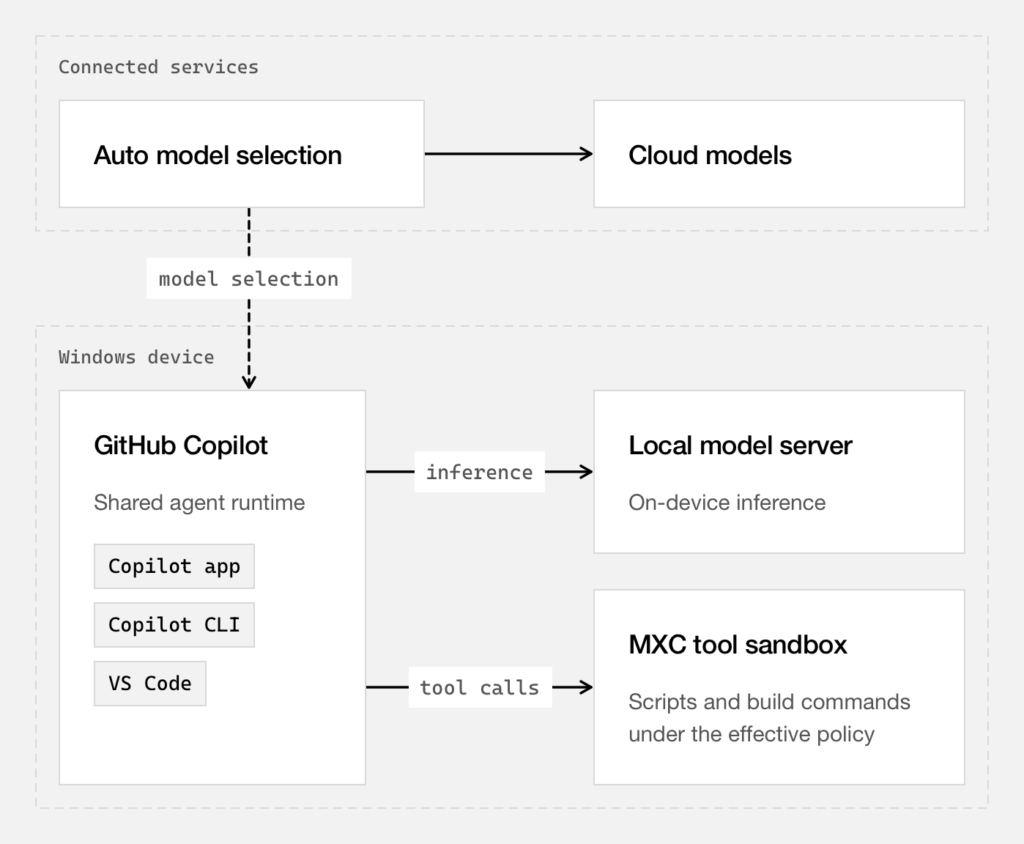
With Auto, developers do not need to decide where each task should be run. Across a multi-turn session, Copilot can consider task context and cache state as it routes work between local and cloud models, preserving useful, cached work as the session evolves.
This orchestrated experience complements direct model selection, giving developers a choice between letting Copilot optimize model placement and choosing a specific local model themselves.
Explicit local-model selection supports workflows that need a specific provider, model, or endpoint. Developers can select MAI Code 1.1 Flash through the Windows ML provider or connect GitHub Copilot to OpenAI-compatible local endpoints and choose from the models those endpoints expose.
How sandboxes help secure tool execution
An agent’s shell commands normally inherit the access of the account running them. Moving inference onto the device doesn’t change that. Sandboxing applies a policy to the processes and local services the agent launches, controlling access to files, networks, credentials, system capabilities, and execution paths regardless of which model requested the work.
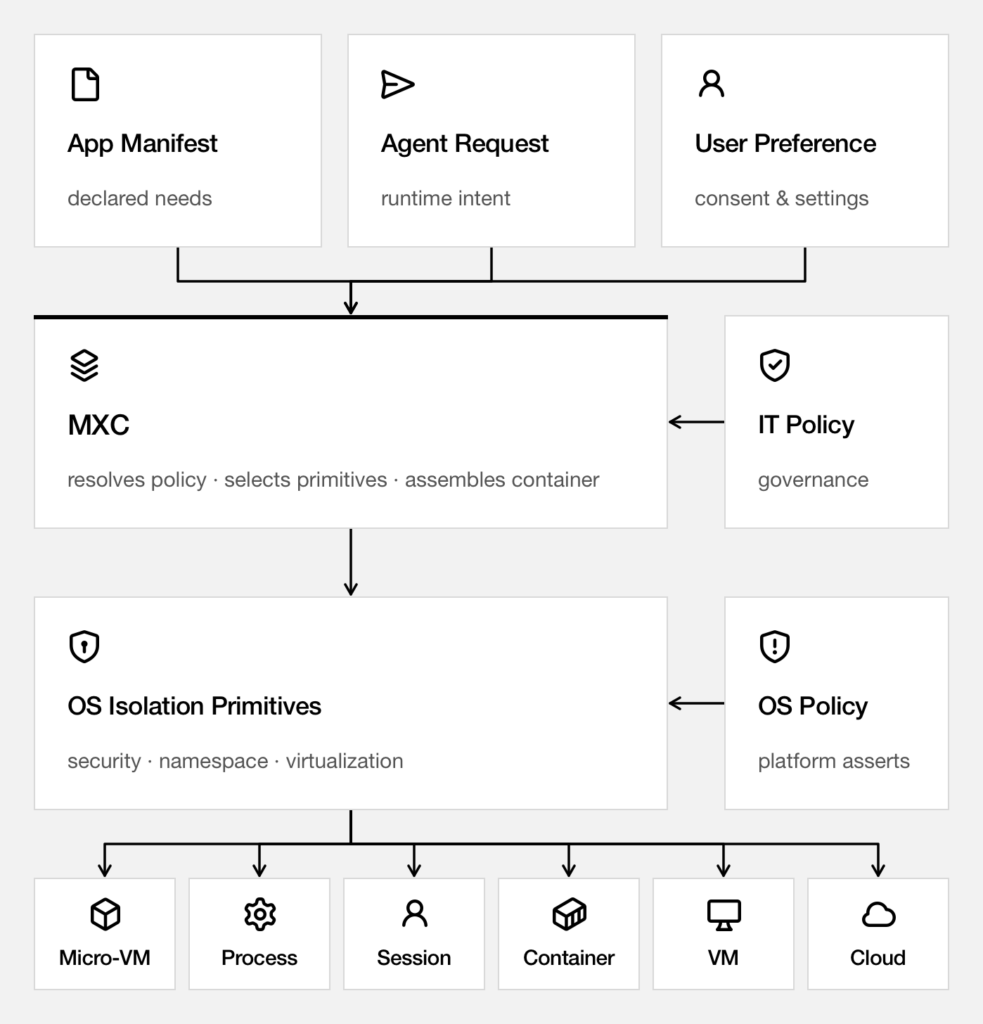
GitHub Copilot uses Microsoft Execution Containers, or MXC, an open-source library from the Windows team that translates policy into native operating-system controls. On Windows, GitHub Copilot uses the BaseContainer tier of the ProcessContainer backend. On macOS, it uses Seatbelt. On Linux, it uses bubblewrap. These local backends don’t require a separate virtual machine or container image, but we plan to make them options available through MXC in the future.
When sandboxing is enabled, shell commands and, by default, local Model Context Protocol servers and language servers run inside the process boundary. Built-in file tools run inside GitHub Copilot itself: the agent harness checks their requests against the effective policy, but those checks aren’t OS-enforced child-process isolation. Remote MCP servers are also outside the local process sandbox; when MCP sandbox controls apply, GitHub Copilot checks their connection policy in process.
Opening the GitHub Copilot CLI and running `/sandbox` slash command allows you to configure your settings at any time.
A real-world example: Daily repository dashboard
To show how these technologies work together, let’s use a real-world example.
Consider a job that reads local repositories, runs their tests in working copies, and writes one HTML report each morning. The source repositories should remain read-only, and the test processes shouldn’t access the network. Model selection is independent: the same job can use a configured local or cloud model.
Enable sandboxing for your project
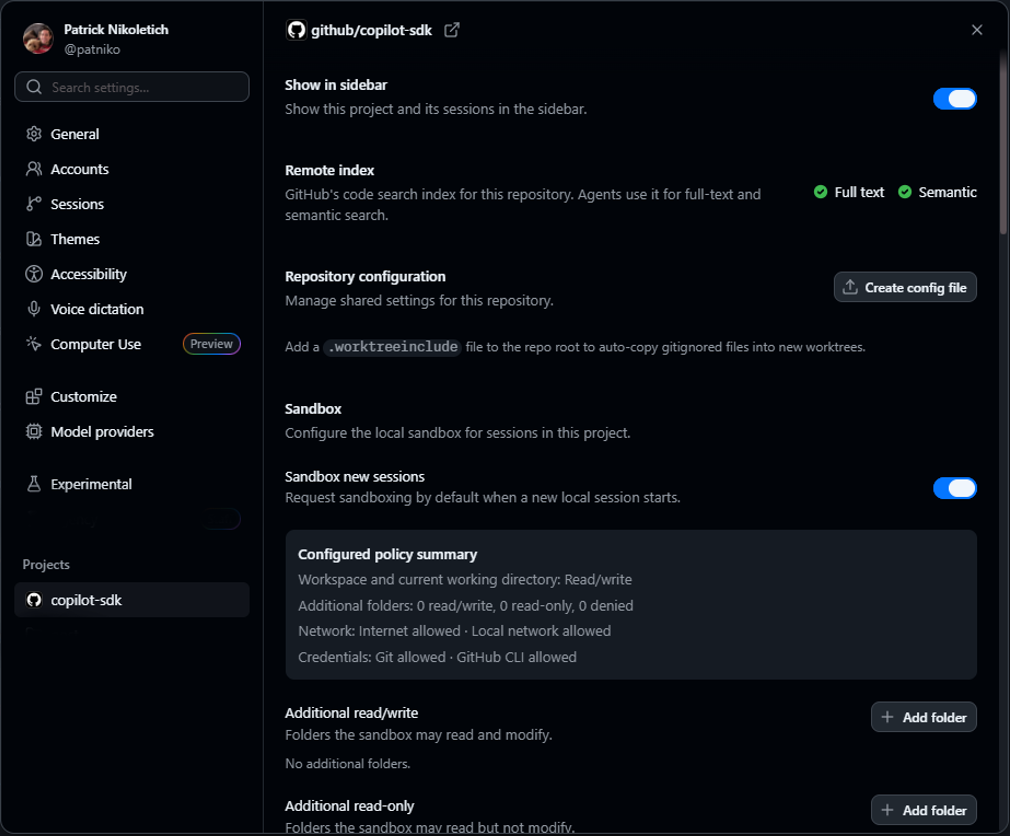
Open the settings dialog by clicking the gear icon in the GitHub Copilot app and selecting your project in the left menu. For this example, we’ll be using the `copilot-sdk` repo that hosts our opensource GitHub Copilot Runtime/SDK project.
Enabling the `Sandbox new sessions` toggle turns on sandboxing by default whenever you work within that project. By default, it’s current working directly is read/write while the rest of the system remains largely read-only or inaccessible to an agent.
Create a new automation
Select the` Automations` section on the left navigation and click the `Start automation` button to open the dialog that allows you to configure a new automation.
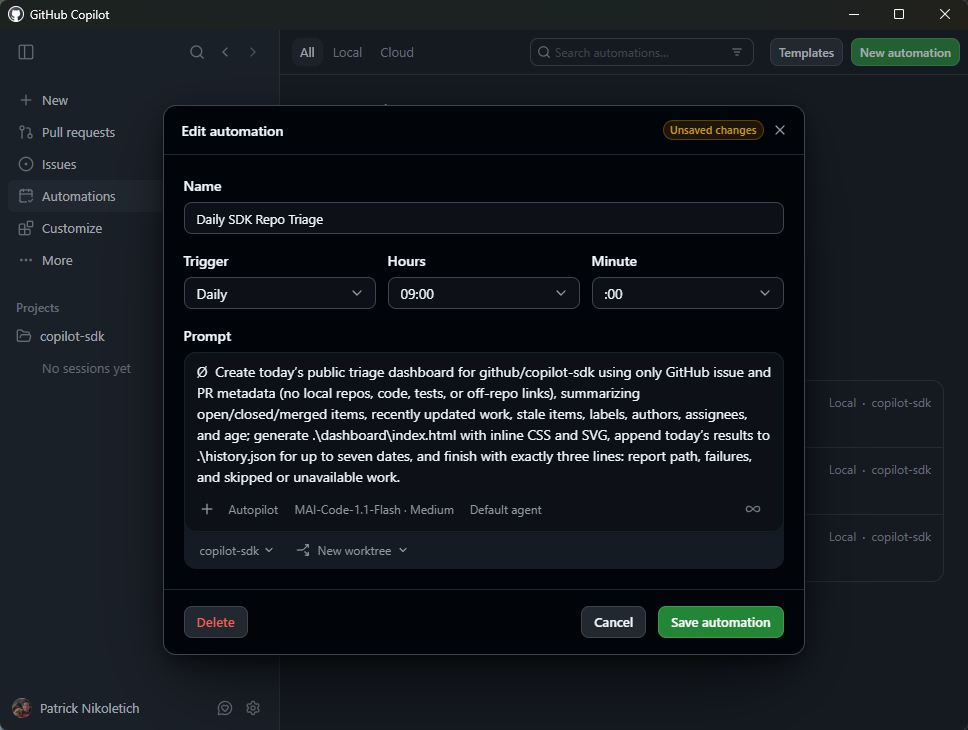
After setting a clear title and a trigger time of 9AM daily, paste in basic instructions to guide the agent through the creation of a daily dashboard for triaging.
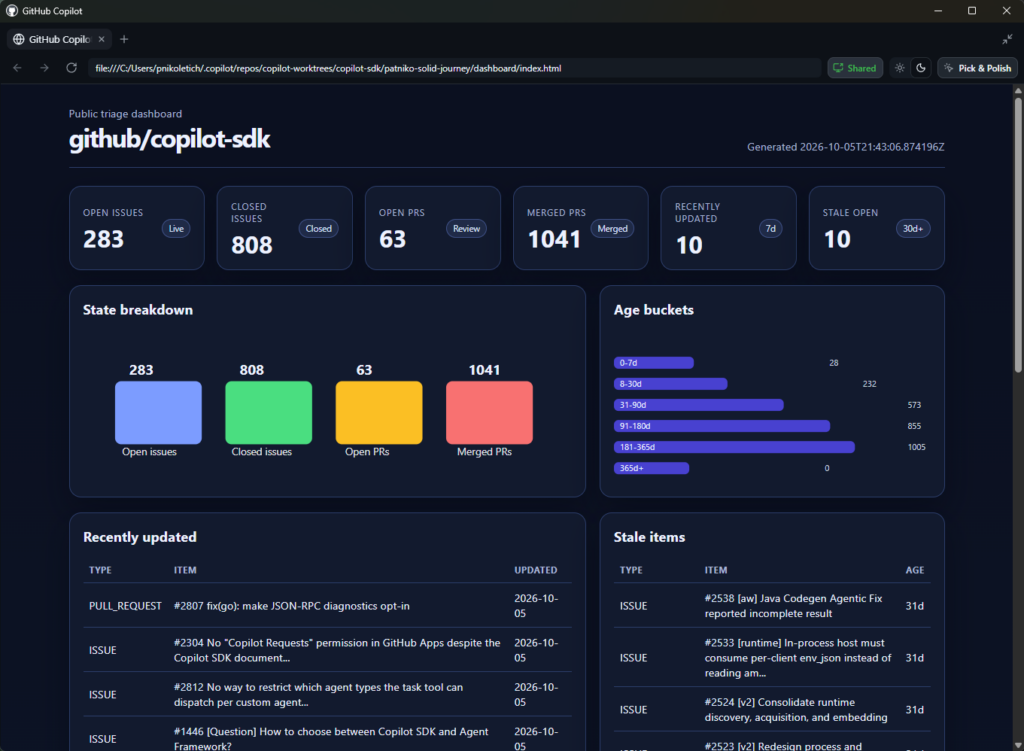
Create today’s public triage dashboard for github/copilot-sdk using only GitHub issue and PR metadata (no local repos, code, tests, or off-repo links), summarizing open/closed/merged items, recently updated work, stale items, labels, authors, assignees, and age; generate .\dashboard\index.html with inline CSS and SVG, append today’s results to .\history.json for up to seven dates, and finish with exactly three lines: report path, failures, and skipped or unavailable work.
Selecting the new MAI Code 1.1 Flash local model and `copilot-sdk` repo we activated sandboxing on allows the agent to work off-line with guardrails that help mitigate unintended changes to your local machine—all while allowing your agent to generate and run scripts within its current working directory to triage and create an interactive dashboard.
After saving, clicking `Run it now` starts executing the new automation right away for verification.
Inspect the result
After the GitHub Copilot agent finishes the task, you can open the session artifacts to view a generated copy of the dashboard that will be refreshed daily. All done locally, and with sandboxes providing basic protection against unwanted system changes while it generates and executes scripts to accomplish the task.
Closing
This is only the beginning of our journey. Local models and sandboxed tools are rolling out now to give developers more choice over where intelligence runs and clearer control over what agents can do. Get started with local development with GitHub Copilot.
Acknowledgements
PM: Ryan Hecht, Tucker Burns, Lei Xu, Pierce Boggan, Nhu Do, Greg Woo, Ramya Krishna Akula, Demetrius Nelon, Harald Kirschner
Engineering: Andrew Feller, Devraj Mehta, Mackinnon Buck, Roman Bulanenko, Chris Dern, Daniel Pagan, Keith Mahoney, Vicente Rivera, Austin Hodges, Anis Mohammed Khaja Mohideen, Stuart Schaefer, Sha Viswanathan, Carlos Alexandro Becker, Logan Ramos
Science: Ani Balasubramaniam, Shengyu Fu, Aashna Garg, Aakash Goel, Karthik Vijayan, Jennifer Zhu, Vivek Pradeep
Marketing: Katie Liu, Alyanna Castillo
This list is not comprehensive of everyone who has worked on this project. Special thanks to the team who put this together.