


Developers are moving quickly from simple chat-based AI experiences to applications that can reason, use tools, coordinate across systems, and complete multi-step and long-running tasks. The first wave of AI apps proved that large language models could understand intent and generate content through patterns like completions, retrieval-augmented generation (RAG) and tool calling. The next wave is about turning those models into reliable, observable, and governable agents that can operate inside real products and enterprise systems. That is the role of Microsoft Agent Framework (MAF).
Microsoft Agent Framework gives developers the building blocks to create agentic applications that combine models, tools, context, memory, planning, and orchestration. It’s designed for teams that need the flexibility of code, the reliability of production infrastructure, and the ability to integrate deeply with Microsoft, open-source, and third-party ecosystems.
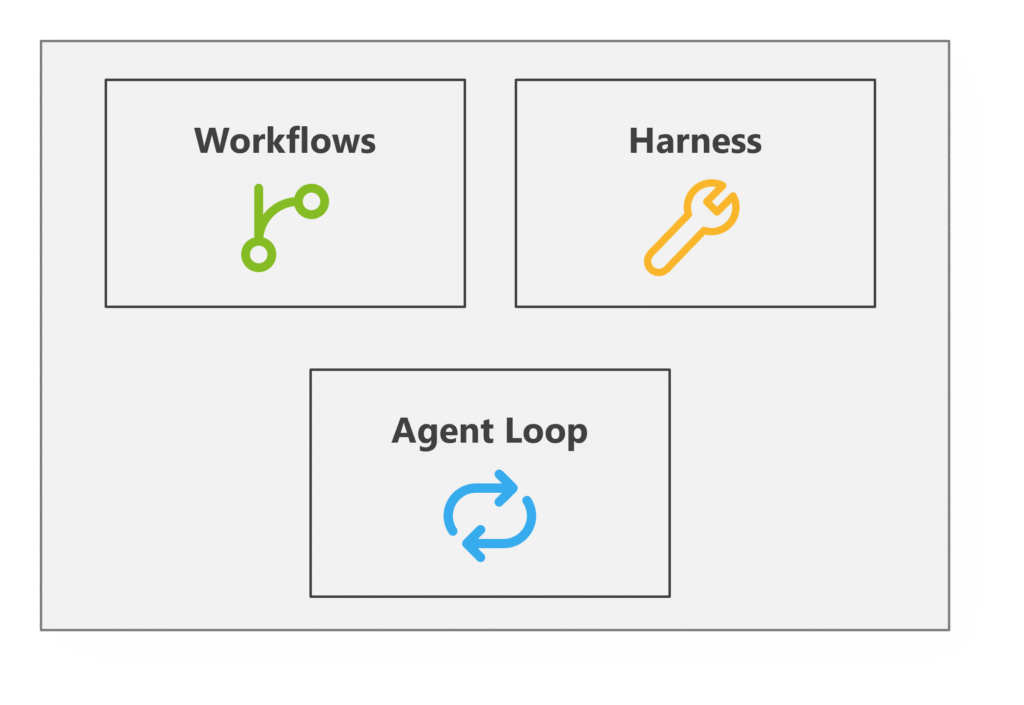
At its core, Microsoft Agent Framework is organized around three ideas:
- Agent loops: The core execution pattern that connects models, conversations, tools, and state
- Workflows: Structured orchestration patterns for multi-step, multi-agent, or business-critical processes
- Harnesses: Reusable runtime capabilities that give agents access to tools, context, memory, planning, controls, and middleware
Together, these concepts give developers a practical way to move from a prompt to a production-ready agent.
Agent loops: The core of agentic execution
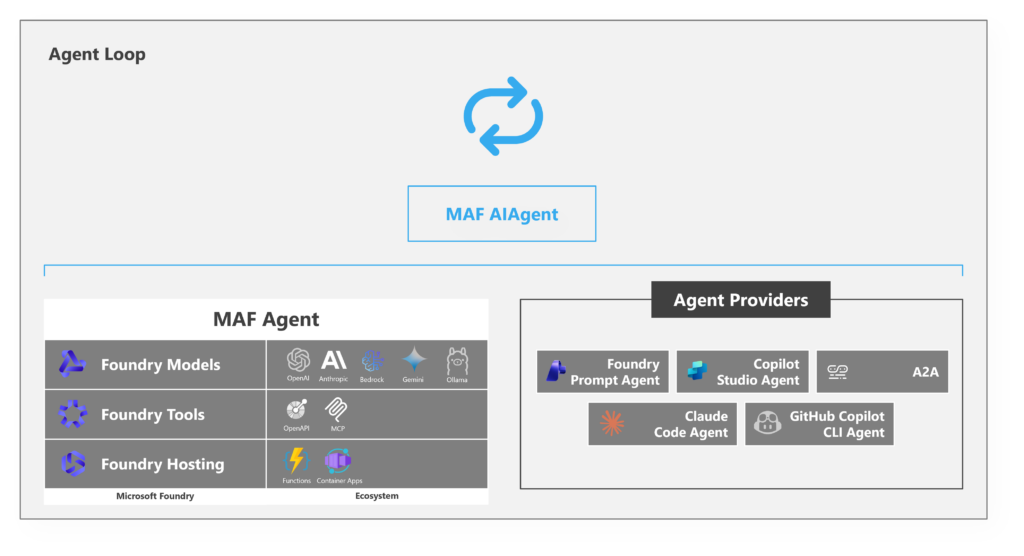
The agent loop is the foundation of any agentic execution. It’s the repeated cycle where an agent receives input, reasons over available context, decides what to do next, optionally calls tools, observes the result, and then continues until it can produce an answer or complete a task.
The agent loop is the repeated cycle where an agent receives input, reasons over available context, decides what to do next, optionally calls tools, observes the result, and then continues.
In a simple chat app, the loop may be straightforward: user message in, model response out. But in an agentic application, the loop becomes more dynamic. The model may decide on a tool, search a knowledge base, call an API, update a task list, generate code, inspect a file, or hand work off to another agent before responding.
while true:
   response = send_to_llm(context, available_tools)
   if response.contains_tool_calls:
       execute each tool
       append results to context
       continue
   if response.is_done:
       break
This pattern is simple to describe, but it can be difficult to implement well. Developers need a way to manage messages, tool schemas, execution results, errors, streaming responses, permissions, and state. Microsoft Agent Framework provides that structure so developers can focus on the behavior of the agent rather than rebuilding the loop from scratch.
The agent loop also creates a consistent place to apply controls. For example, a team may want to limit which tools an agent can call, require approval before certain actions, compact context when conversations get too long, or log every step for observability. By making the loop explicit, those policies can be applied consistently.
Provider-agnostic by design
One of the most important principles behind Microsoft Agent Framework is that agentic applications shouldn’t be locked to a single model, tool provider, or hosting environment. That’s why Microsoft Agent Framework is built to be provider-agnostic. Developers can compose agents that work across a range of models, tools, and hosted agent providers. Depending on the scenario, an agent may use models and tools from Microsoft Foundry or from third-party providers like OpenAI or Anthropic. Microsoft Agent Framework can also interact with agents hosted elsewhere, including Copilot Studio or GitHub Copilot, or through A2A as an open protocol.
Workflows: Structure for reliable orchestration
Agent loops are powerful because they’re flexible, but many enterprise scenarios require predictable steps, explicit control flow, or repeatable business logic. A customer support process may need to classify an issue, retrieve account details, draft a response, check policy compliance, and escalate when necessary. A software engineering assistant may need to inspect an issue, reproduce a bug, write a patch, run tests, and create a pull request. A research agent may need to gather sources, compare evidence, produce a summary, and ask for review. These aren’t just conversations – they’re workflows.
In Microsoft Agent Framework, a workflow can describe how tasks move from one step to another, when agents should collaborate, where human input is required, and how results should be validated.
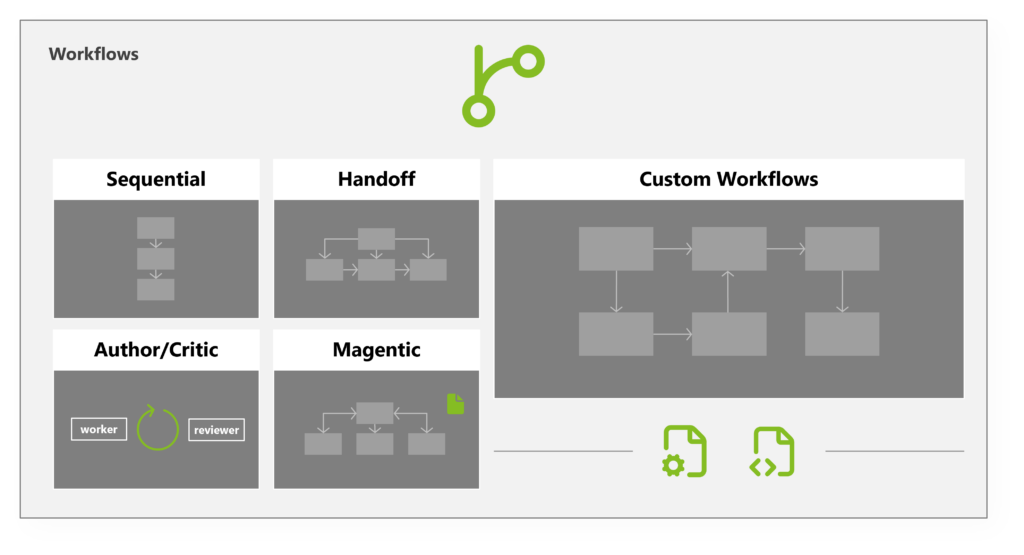
Common workflow patterns include:
- Sequential flows, where each step depends on the output of the previous step
- Handoffs, where one agent or component delegates work to another
- Author/critic loops, where one agent produces an output and another reviews or improves it
- Magentic-style orchestration, where a coordinating agent plans and supervises work across tools or subagents
- Custom workflows, where developers define a domain-specific control flow for their application
The key idea is that developers should be able to choose the right level of autonomy for the task. Some scenarios benefit from a highly autonomous loop. Others require a carefully designed workflow with checkpoints and human review. Microsoft Agent Framework supports both.
Harnesses: The runtime capabilities around the agent
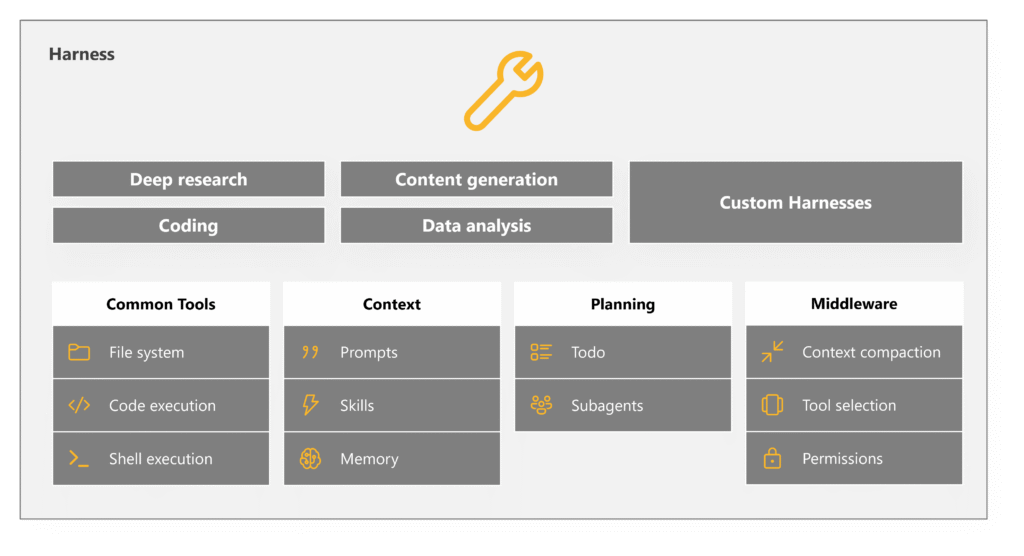
If the agent loop is the engine and workflows are the process structure, the harness is the set of capabilities that surround the agent and make it useful in the real world. A harness can include specific tools, context, memory, planning, middleware, permissions, and other runtime services. These are the pieces that turn an agent from a model-driven conversation into a capable long-running application component.
For example, a harness might provide access to common tools like file systems, code execution, or shell execution; context including system prompts and memory; and control capabilities such as subagents, context compaction, permission checks, human approval gates, logging, and tracing.
This surrounding layer is critical because agent quality depends heavily on the environment in which the model operates. A strong model with poor tools, weak context, and no controls will still produce a poor result. A well-designed harness helps the agent act with the right information, the right capabilities, and the right boundaries.
Why this matters
Developers need agent frameworks that match how real software is built. They need flexibility, because the model and tool ecosystem is changing quickly. They need structure, because production systems require reliability. They need openness, because applications often span multiple services and providers. And they need control, because agents are increasingly able to take meaningful action.
Not every agent needs a complex workflow. Not every workflow needs a highly autonomous agent.
Microsoft Agent Framework is layered and designed for that reality. It gives developers a clear agent loop for reasoning and tool use; workflow patterns for structured orchestration; harness capabilities for tools, context, memory, planning, and controls; and provider-agnostic composition across models, tools, and hosted agents.
Most importantly, Microsoft Agent Framework lets developers choose the right architecture for the job. Not every agent needs a complex workflow. Not every workflow needs a highly autonomous agent. Microsoft Agent Framework supports simple assistants, complex multi-agent systems, and structured enterprise processes within one coherent model.
If you’re taking agents from prototype to production, Microsoft Agent Framework may be right for you—especially if you’re working in .NET or Python. Download the SDK on GitHub, read the documentation, visit the developer blog, or join the Discord.